
In this post we collect patterns and examples for working with custom entites in RAP.
Adding a read-only custom entity to an existing RAP BO
🔢 Implemented in S/4 HANA ON PREMISE 2023 – SP02
Use case: Display a document preview that is calculated at runtime. The data may come from application tables as well as customizing data, but the result is read-only and cannot be modified.
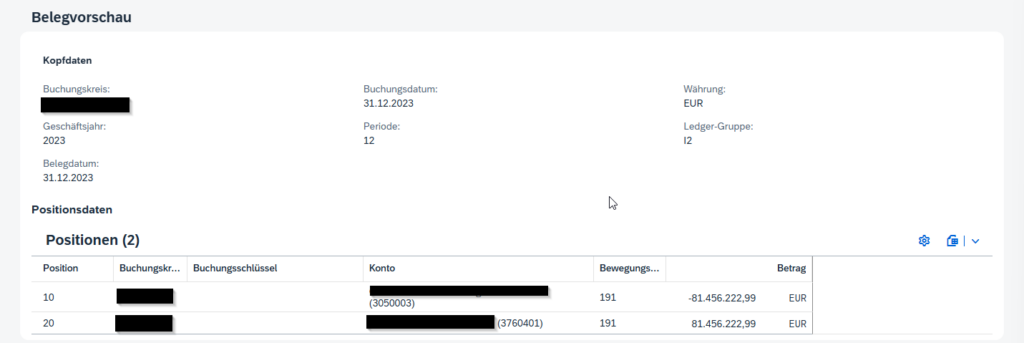
A custom entity is a nice way to realize this scenario since it allows you to dynamically provide data without persistence.
There is no need to include the custom entity in the behavior definition. Also there is no need for interface/consumption view layer differentiation. Just create one view for the custom entity.
Define Custom Entities
The data logic is implemented in the query provider class – see Code template for if_rap_query_provider
Header Entity
@EndUserText.label: '##GENERATED ZFI_XXX_POSPREV'

@ObjectModel.query.implementedBy: 'ABAP:ZCL_XXX_POSPREV_QUERY'

define custom entity ZR_FI_XXX_POSPREV

{


key RunUUID : sysuuid_x16;

key PosPrevUUID : sysuuid_x16;


CompanyCode : bukrs;

FiscalYear : fis_gjahr_no_conv;

DocumentDate : bldat;

PostingDate : budat;

Period : fins_fiscalperiod;

Currency : fis_hwaer;

Ledger : fins_ledger;


_PostingPreviewItems : composition [0..*] of ZR_FI_XXX_POSPREVITM;


}
Item Entity
@EndUserText.label: '##GENERATED ZFI_XXX_POSPREV_ITM'

@ObjectModel.query.implementedBy: 'ABAP:ZCL_XXX_POSPREVI_QUERY'

define custom entity ZR_FI_XXX_POSPREVITM

{

key RunUUID : sysuuid_x16;

key PosPrevUUID : sysuuid_x16;

key CompanyCode : bukrs;

key ItmPosition : posnr_acc;

TransactionType : rmvct;

Account : racct;

AccountName : fis_txt50_skat;

PostingKey : bschl;

@Semantics.amount.currencyCode : 'Currency'

Amount : fis_dr_hsl;

Currency : fis_hwaer;


_PostingPreview : association to parent ZR_FI_XXX_POSPREV on $projection.RunUUID = _PostingPreview.RunUUID

and $projection.PosPrevUUID = _PostingPreview.PosPrevUUID;


}
Expose Custom Entity in Root BO
To make the custom entity available in the application, we need to associate it with the root entity.
Interface view
Create an association from the root entity to the custom entity.
@AccessControl.authorizationCheck: #CHECK

@EndUserText.label: '##GENERATED ZFI_XXX_RUN'

define root view entity ZR_FI_XXX_RUN

association [0..1] to ZR_FI_XXX_POSPREV as _PostingPreview on $projection.RunUUID = _PostingPreview.RunUUID

{

...

_PostingPreview

}
Consumption view
Expose the association in the projection view so it becomes available in the UI.
@AccessControl.authorizationCheck: #CHECK

@Metadata.allowExtensions: true

@EndUserText.label: 'Projection View for ZR_FI_XXX_RUN'

define root view entity ZC_FI_XXX_RUN

provider contract transactional_query

as projection on ZR_FI_XXX_RUN

{

...

_PostingPreview


}
UI Annotations for Fiori
💡Limitations of custom entities:
- Metadata extensions are not supported – annotations must be defined directly in the custom entity
- Text associations are not automatically resolved – texts must be populated manually and exposed via annotations
Header Annotations
Defines the structure (facets + field groups) of the preview in the Fiori object page.
@EndUserText.label: '##GENERATED ZFI_XXX_POSPREV'

@ObjectModel.query.implementedBy: 'ABAP:ZCL_XXX_POSPREV_QUERY'

define custom entity ZR_FI_XXX_POSPREV

{

@UI.facet : [{

id: 'POSTING_PREVIEW',

type : #FIELDGROUP_REFERENCE,

label : 'Kopfdaten',

position: 10,

targetQualifier: 'POSTING_PREVIEW' },

{ id : 'POSTING_PREVIEW_ITEMS',

type : #LINEITEM_REFERENCE,

label : 'Positionen',

position: 20,

targetElement: '_PostingPreviewItems'}]


@UI.hidden : true

key RunUUID : sysuuid_x16;

@UI.hidden : true

key PosPrevUUID : sysuuid_x16;


@UI.fieldGroup : [ { qualifier: 'POSTING_PREVIEW', position: 10} ]

CompanyCode : bukrs;

@UI.fieldGroup : [ { qualifier: 'POSTING_PREVIEW', position: 20} ]

FiscalYear : fis_gjahr_no_conv;

@UI.fieldGroup : [ { qualifier: 'POSTING_PREVIEW', position: 30} ]

DocumentDate : bldat;

@UI.fieldGroup : [ { qualifier: 'POSTING_PREVIEW', position: 40} ]

PostingDate : budat;

@EndUserText.label : 'Periode'

@UI.fieldGroup : [ { qualifier: 'POSTING_PREVIEW', position: 50} ]

Period : fins_fiscalperiod;

@EndUserText.label : 'Währung'

@UI.fieldGroup : [ { qualifier: 'POSTING_PREVIEW', position: 60} ]

Currency : fis_hwaer;

@EndUserText.label : 'Ledger-Gruppe'

@UI.fieldGroup : [ { qualifier: 'POSTING_PREVIEW', position: 70} ]

Ledger : fins_ledger;


_PostingPreviewItems : composition [0..*] of ZR_FI_XXX_POSPREVITM;


}
Item Annotations
Defines the line item table shown in the preview.
@EndUserText.label: '##GENERATED ZFI_XXX_POSPREV_ITM'

@ObjectModel.query.implementedBy: 'ABAP:ZCL_XXX_POSPREVI_QUERY'

@UI: {

headerInfo: {

typeName: 'Position',

typeNamePlural: 'Positionen',

title: { type: #STANDARD, label: 'Position', value : 'ItmPosition' }

}

}

define custom entity ZR_FI_XXX_POSPREVITM

{

@UI.hidden : true

key RunUUID : sysuuid_x16;

@UI.hidden : true

key PosPrevUUID : sysuuid_x16;

@EndUserText.label: 'Buchungskreis'

@UI.lineItem : [{ position: 20 }]

key CompanyCode : bukrs;

@EndUserText.label: 'Position'

@UI.lineItem : [{ position: 10 }]

key ItmPosition : posnr_acc;

@UI.lineItem : [{ position: 50 }]

TransactionType : rmvct;

@EndUserText.label: 'Konto'

@UI.lineItem : [{ position: 40 }]

@ObjectModel.text.element: [ 'AccountName' ]

Account : racct;

AccountName : fis_txt50_skat;

@UI.lineItem : [{ position: 30 }]

PostingKey : bschl;

@EndUserText.label: 'Betrag'

@Semantics.amount.currencyCode : 'Currency'

@UI.lineItem : [{ position: 60 }]

Amount : fis_dr_hsl;

@UI.hidden : true

@EndUserText.label: 'Währung'

Currency : fis_hwaer;


_PostingPreview : association to parent ZR_FI_XXX_POSPREV on $projection.RunUUID = _PostingPreview.RunUUID

and $projection.PosPrevUUID = _PostingPreview.PosPrevUUID;


}
Root entity Annotations
Finally, expose the preview section via the root entity metadata extension.
@UI.facet: [ {

id: 'POSTING_PREVIEW_SECTION',

label: 'Belegvorschau',

type: #COLLECTION,

position: 40,

targetQualifier: 'POSTING_PREVIEW_SECTION'

},

{

id: 'POSTING_PREVIEW',

purpose: #STANDARD,

parentId: 'POSTING_PREVIEW_SECTION',

label: 'Kopfdaten',

type: #FIELDGROUP_REFERENCE,

position: 41,

targetElement: '_PostingPreview',

targetQualifier: 'POSTING_PREVIEW'

},

{

id: 'POSTING_PREVIEW_ITEMS',

purpose: #STANDARD,

parentId: 'POSTING_PREVIEW_SECTION',

label: 'Positionsdaten',

type: #LINEITEM_REFERENCE,

position: 42,

targetElement: '_PostingPreview._PostingPreviewItems'

} ]