
It’s very common in RAP applications to model a business object with one or more child entities. Think of the classic Business Partner which consists of a root node with several child nodes.
- Business Partner (root)
- Bank Connections
- Address Data
This blog post shows how to add such child entities (via composition and redirected associations) to an existing RAP BO.
Preview of the result:
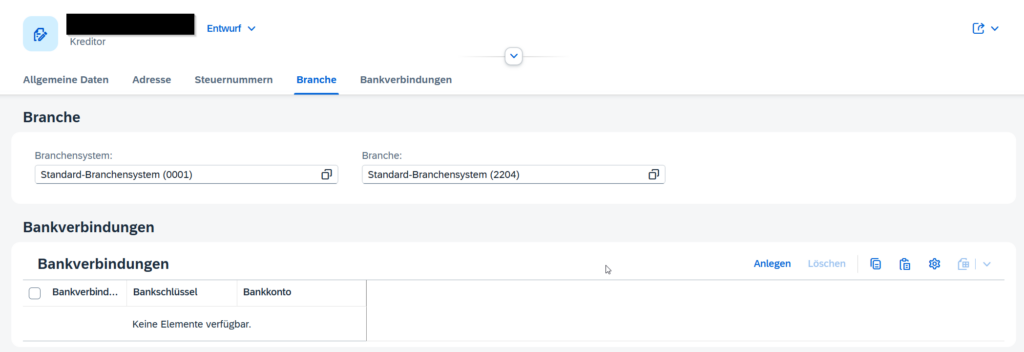
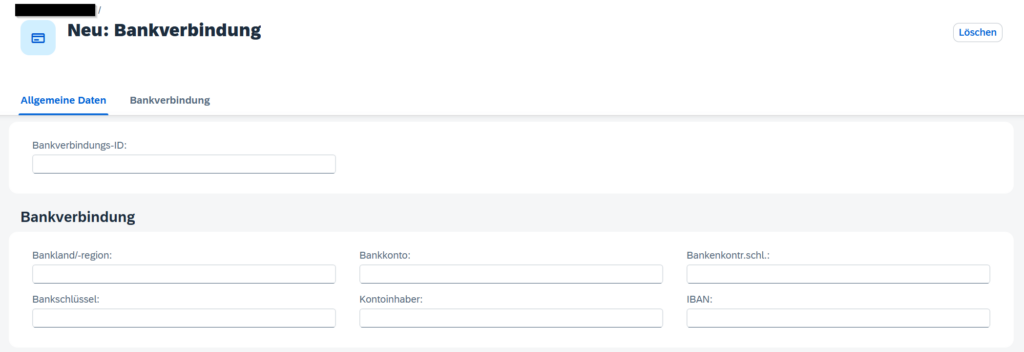
Prerequisites
You should already have a custom RAP BO that you want to extend with child entities. If you are new to RAP or haven’t created a BO yet, checkout SAP’s official introduction – Get to Know the ABAP RESTful Application Programming Model.
Generate boilerplate coding via “Generate ABAP Repository Objects”
After creating your custom table, right click it and use the function Generate ABAP Repository Objects…
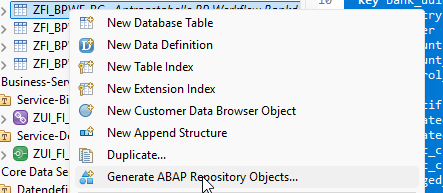
The wizard generates all required objects, including CDS views, behavior definitions and classes. The table below shows which of these generated objects you actually need to keep and which ones can be removed.
| Object | Keep/Delete Afterwards |
|---|---|
| CDS view entity | Keep |
| CDS behavior definition | Copy boilerplate code, delete afterwards |
| ABAP implementation class | Delete |
| CDS projection view entity | Keep |
| CDS projection behavior definition | Delete |
| Draft database table | Keep if your root entity has draft |
| Metadata extension | Keep |
| CDS service definition | Delete |
| CDS view entity | Delete |
Link root and child entities (interface layer)
We need to link the existing root entity with the new child entity and vice versa via composition and association to parent.
In the interface view of the root entity, define a composition:
@AccessControl.authorizationCheck: #CHECK

@EndUserText.label: '##GENERATED ZFI_BPWF_HEADER'

define root view entity ZR_FI_BPWF_HEADER

as select from zfi_bpwf_header as Root

composition [0..*] of ZI_BPWF_BC as _BankData

...


{

key uuid as UUID,

belnr as Belnr,

role as BusinessPartnerRole,

...

_BankData


}
In the child interface view, link back to the parent:
@AbapCatalog.viewEnhancementCategory: [#NONE]

@AccessControl.authorizationCheck: #NOT_REQUIRED

@EndUserText.label: 'Interface view for ZFI_BPWF_BC (Bankconnections)'

@Metadata.ignorePropagatedAnnotations: true

define view entity ZI_BPWF_BC

as select from zfi_bpwf_bc

association to parent ZR_FI_BPWF_HEADER as _Header on $projection.HeaderUuid = _Header.UUID

{

key header_uuid as HeaderUuid,

key bank_uuid as BankUuid,

bank_country as BankCountry,

...


_Header

}
Link root and child entities (consumption layer)
We need to link the existing root entity with the new child entity and vice versa via redirected to composition child and redirected to parent.
In the projection view of the root, redirect the composition:
@AccessControl.authorizationCheck: #CHECK

@Metadata.allowExtensions: true

@Search.searchable: true

@EndUserText.label: 'Projection View for ZR_FI_BPWF_HEADER'

define root view entity ZC_FI_BPWF_HEADER

provider contract transactional_query

as projection on ZR_FI_BPWF_HEADER

{

key UUID,

Belnr,

...

_BankData : redirected to composition child ZC_BPWF_BC


}
In the child projection, redirect back to the parent:
@AccessControl.authorizationCheck: #NOT_REQUIRED

@Metadata.allowExtensions: true

@EndUserText.label: 'Consumption view for ZFI_BPWF_BC (Bankconnections)'

@Metadata.ignorePropagatedAnnotations: true

define view entity ZC_BPWF_BC

as projection on ZI_BPWF_BC

{

key HeaderUuid,

key BankUuid,

BankCountry,

...

_Header : redirected to parent ZC_FI_BPWF_HEADER

}
Enhance the root behavior definition (interface & consumption layer)
Enhancing the root behavior definition is straightforward. Simply add the new behavior block for your child entity directly into the existing behavior definition file of the root BO.
The easiest approach is to copy the boilerplate behavior code from the generated behavior definition and paste it into your main behavior file.
Once done, you can safely delete the generated behavior definition.
Interface behavior definition
managed implementation in class ZBP_FI_BPWF_HEADER unique;

strict ( 2 );

with draft;


define behavior for ZR_FI_BPWF_HEADER alias Root

...

}


define behavior for ZI_BPWF_BC alias BankConnection

persistent table zfi_bpwf_bc

draft table zfi_bpwf_bcd

lock dependent by _Header

authorization dependent by _Header

{


field ( readonly )

HeaderUuid,

BankUuid;


field ( numbering : managed )

BankUuid;


update;

delete;


association _Header;

mapping for zfi_bpwf_bc

{

HeaderUuid = header_uuid;

BankUuid = bank_uuid;

BankCountry = bank_country;

BankNumber = bank_number;

BankAccount = bank_account;

BankAccountHolder = bank_account_holder;

BankControlKey = bank_control_key;

Iban = iban;

BankIdentification = bank_identification;

LocalCreatedBy = local_created_by;

LocalCreatedAt = local_created_at;

LocalLastChangedBy = local_last_changed_by;

LocalLastChangedAt = local_last_changed_at;

LastChangedAt = last_changed_at;

}

}
Consumption behavior definition
strict ( 2 );

use draft;


define behavior for ZC_FI_BPWF_HEADER alias Root

use etag


{

use create;

use update;

use delete;


use association _BankData { create; }


use action Edit;

use action Activate;

use action Discard;

use action Resume;

use action Prepare;

use action createChangeReequest;

use action createSupplierCR;


}


define behavior for ZC_BPWF_BC alias BankConnection {

use update;

use delete;

use association _Header;

}
Add child entity to your service definition
@EndUserText.label: 'Service definition for ZC_FI_BPWF_HEADER'

define service ZUI_FI_BPWF_HEADSER_O4 {

expose ZC_FI_BPWF_HEADER as Root;

expose ZC_BPWF_BC as BankConnection;

...

}
Adjust the metadata extension files
To display the child entity as a table inside the root object detail page just add your association as a #LINEITEM_REFERENCE.
@Metadata.layer: #CORE

...

annotate view ZC_FI_BPWF_HEADER with

{

@UI.facet: [

{

...

{

id: 'BANK_CONNECTION',

type: #LINEITEM_REFERENCE,

targetElement: '_BankData',

targetQualifier: 'BANK_CONNECTION',

label: 'Bankverbindungen',

position: 50

}

]

...

}
In the generated metadata extension for your child entity you can adjust which columns etc. are shown and how the detail page looks via @UI.lineItem, @UI.Identification,…
Extras
Deep Insert via EML
May you face the requirement to create a root entity together with one or more child entities in a single step – comparable to a deep insert. The following snippets show how this can be achieved using EML in a static factory action.
Static Factory Action Definition
The static factory action is defined in the interface behavior definition and receives a simple paramter structure.
static factory action createSupplierCR parameter ZA_BPWF_SUPPCR_PARAMS [1];
define abstract entity ZA_BPWF_SUPPCR_PARAMS
{
Supplier : lifnr;
}
Static Factory Action Implementation
%cid_reflinks each bank record to the root instance.%cidmust be unique –sy-indexis sufficient in this case. No database keys are provided as both entitys have managed numbering.
METHOD createsuppliercr.

  DATA draft_data TYPE zr_fi_bpwf_header.

  DATA bank_connections_cba TYPE TABLE FOR CREATE zr_fi_bpwf_header\\root\_bankdata.

  LOOP AT keys ASSIGNING FIELD-SYMBOL(<key_structure>).

    "read passed parameters
    DATA(supplier) = <key_structure>-%param-supplier.

    "get bp uuid
    DATA supplier_keys TYPE i_suppliertobusinesspartner.

    SELECT SINGLE businesspartneruuid, supplier
      FROM i_suppliertobusinesspartner
      WHERE supplier EQ @supplier
      INTO CORRESPONDING FIELDS OF @supplier_keys.

    IF supplier_keys-supplier IS INITIAL.
      failed-root   = VALUE #( ( %cid = <key_structure>-%cid ) ).
      reported-root = VALUE #( ( %msg = new_message( id       = 'ZFI_BPWF'
                                                     number   = '001'
                                                     severity = if_abap_behv_message=>severity-error ) ) ).
      RETURN.
    ENDIF.

    "get general data
    SELECT SINGLE
        businesspartner     AS partner,
        organizationbpname1 AS nameorg1,
        organizationbpname2 AS nameorg2,
        organizationbpname3 AS nameorg3,
        formofaddress       AS formofaddress,
        searchterm1         AS busort1
      FROM i_businesspartner
      WHERE businesspartneruuid EQ @supplier_keys-businesspartneruuid
      INTO CORRESPONDING FIELDS OF @draft_data.

    "get bank connections for association
    SELECT *
      FROM i_businesspartnerbank
      WHERE businesspartner EQ @draft_data-partner
      INTO TABLE @DATA(bank_connections).

    bank_connections_cba = VALUE #(
      FOR bank_connection IN bank_connections (
        %cid_ref = <key_structure>-%cid
        %target  = VALUE #( ( %cid               = sy-index
                              bankcountry        = bank_connection-bankcountrykey
                              banknumber         = bank_connection-banknumber
                              bankaccount        = bank_connection-bankaccount
                              bankaccountholder  = bank_connection-bankaccountholdername
                              bankcontrolkey     = bank_connection-bankcontrolkey
                              iban               = bank_connection-iban
                              bankidentification = bank_connection-bankidentification ) )
      )
    ).

    MODIFY ENTITIES OF zr_fi_bpwf_header IN LOCAL MODE
      ENTITY root
        CREATE FIELDS ( partner supplier nameorg1 nameorg2 nameorg3 )
        WITH VALUE #( ( %cid     = <key_structure>-%cid
                        partner  = draft_data-partner
                        supplier = supplier_keys-supplier
                        nameorg1 = draft_data-nameorg1
                        nameorg2 = draft_data-nameorg2
                        nameorg3 = draft_data-nameorg3 ) )
        CREATE BY \_bankdata
          FIELDS ( bankcountry banknumber bankaccount bankaccountholder bankcontrolkey iban bankidentification )
          WITH bank_connections_cba
      MAPPED   mapped
      FAILED   failed
      REPORTED DATA(reported_create_v1).

    reported = CORRESPONDING #( BASE ( reported ) reported_create_v1 ).

    IF failed IS NOT INITIAL.
      RETURN.
    ENDIF.

  ENDLOOP.

ENDMETHOD.