
🚧 Work in Progress: This guide grows as I do.
General
General things that are good to know
Key & Text Display in Value Helps
When implementing value helps, remember that you can also customize how the input field displays the key and description using @ObjectModel.text.element and @UI.textArrangement.

Consumption layer
define view entity ZC_BPWF_BC

as projection on ZI_BPWF_BC

{

key HeaderUuid,

key BankUuid,

@ObjectModel.text.element: ['BankCountryName']

@Consumption.valueHelpDefinition: [{ entity: { name: 'I_CountryVH', element : 'Country' }, useForValidation: true }]

BankCountry,

_BankCountry._Text.CountryName as BankCountryName : localized,

_BankCountry

}
Metadata extension
annotate view ZC_BPWF_BC with

{

...

@UI.textArrangement: #TEXT_ONLY

BankCountry;

}
The following options are available: #TEXT_FIRST, #TEXT_LAST,#TEXT_ONLY,#TEXT_SEPERATE.
Why interface associations and value help entities can differ
The association in the interface view and the value help definition in the consumption view do not need to be the same.
Interface view
The interface view is used for the technical data model. It defines semantic associations such as _Country for navigation and text retrieval.
association [0..1] to I_Country as _Country on $projection.Country = _Country.Country

...

country as Country,

...

_Country
Consumption view
The consumption view is used for the UI layer. It can provide a different value help entity, in this case I_Country_VH, which is optimized for search and end-user experience.
@ObjectModel.text.element: ['CountryName']


@Consumption.valueHelpDefinition: [{ entity: { name: 'I_CountryVH', element : 'Country' }, useForValidation: true }]


Country,


_Country._Text.CountryName as CountryName : localized,
additionalBinding
localElement
If your view uses a different property name than the element in the value help CDS you must use localElement.
@Consumption.valueHelpDefinition: [{ entity: { name: 'C_TaxTypeVHTemp', element: 'TaxType' }, additionalBinding: [{ localElement: 'Taxtype1' }], useForValidation: true }]

Taxtype1,
localConstant
Using additionalBinding a static value aka. localConstant can be passed to the value help. In the following example, the field TpcAccount stores a TPC G/L account. The standard value help I_GLAcctInChtOfAcctsStdVH requires both the G/L account and the chart of accounts as input. Since the chart of accounts is always TPC in this business scenario, there is no need to expose it to the user. we can directly set it as a localConstant.
@AccessControl.authorizationCheck: #CHECK

@Metadata.allowExtensions: true

@EndUserText.label: 'Projection View for ZR_XXX_RUN'

define root view entity ZC_XXX_RUN

provider contract transactional_query

as projection on ZR_XXX_RUN

{

key RunUUID,

@ObjectModel.text.element: [ 'TpcAccountName' ]

@Consumption.valueHelpDefinition: [{ entity: { name: 'I_GLAcctInChtOfAcctsStdVH', element: 'GLAccount' }, additionalBinding: [{ localElement: 'TpcAccount', element: 'GLAccount' }, { localConstant: 'TPC', element: 'ChartOfAccounts'}], useForValidation: true }]

TpcAccount,

_TPCAccount._Text.GLAccountLongName as TpcAccountName : localized,

...

_TPCAccount


}
Value help with dependent keys
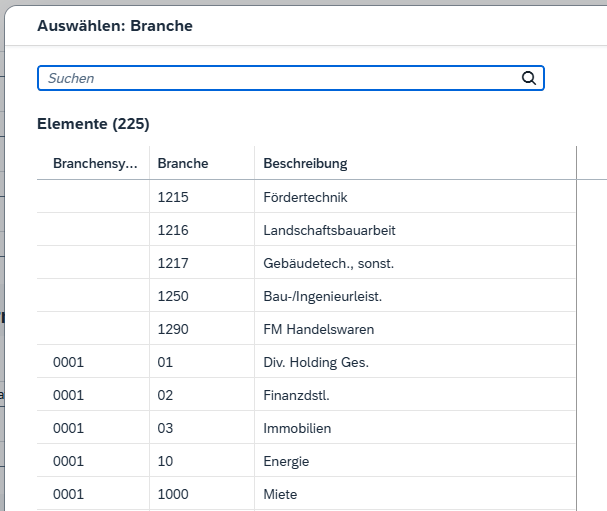
Sometimes a field’s value help depends on another field. In this case, the cds view must pass all required keys to the value help. This is done using additionalBinding.
💡When IndustrySystemType is selected first, the value help for IndustrySector will automatically be pre-filtered – When IndustrySector is selected first through the value help, the IndustrySystemType will be automatically set.
@ObjectModel.text.element: [ 'IndustrySystemName']

@Consumption.valueHelpDefinition: [{ entity: { name: 'C_IndustrySystemVHTemp', element: 'IndustrySystemType' }, useForValidation: true }]

IndustrySystemType,

_IndustrySystem._Text.IndustrySystemName as IndustrySystemName : localized,

@ObjectModel.text.element: [ 'IndustrySectorName']

@Consumption.valueHelpDefinition: [{ entity: { name: 'C_Industryvhtemp', element: 'IndustrySector' }, additionalBinding: [{ localElement: 'IndustrySystemType', element: 'IndustrySystemType' }], useForValidation: true }]

IndustrySector,

_IndustrySector._IndustryKeyText.IndustryName as IndustrySectorName : localized,

Domain value help
For simple code lists defined in ABAP dictionary domains, you can generate value helps extremely quickly using SAP delivered domain value cds views. Use I_DomainFixedValue (safe choice) or DDCDS_CUSTOMER_DOMAIN_VALUE (successor).
define view entity ZI_XXXVH

as select from I_DomainFixedValue

{

@ObjectModel.text.element: ['DomainText']

key DomainValue as Xxx,

@Semantics.text: true

_DomainFixedValueText[1: Language = $session.system_language].DomainText as XxxText

}

where

SAPDataDictionaryDomain = 'ZXXX';
How to Adjust a Standard SAP Value Help to Your Needs
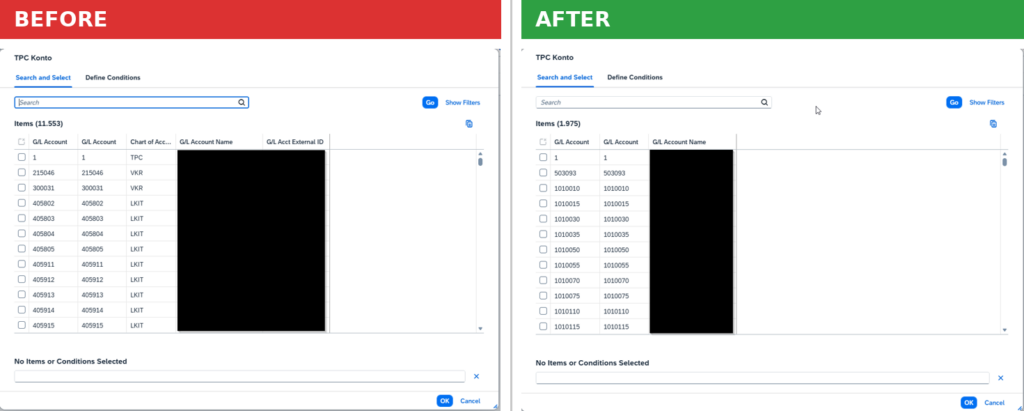
Sometimes a standard SAP value help does not fully meet business requirements. In these cases, creating a custom value help is often the simplest solution.
The following snippets show how to create custom value helps based on existing SAP standard value helps.
Create a Value Help Based on the Underlying Standard CDS View
In many cases, the standard value help already provides most of the required functionality. The easiest approach is therefore to identify the underlying CDS view, keep only the required fields, and remove everything that is not needed.
SAP Standard Value Help
The following standard CDS view is used to provide G/L account value help functionality:
//GENERATED:001:GlBfhyFV7jUzaDT}MP9DVm

@AbapCatalog.sqlViewName: 'IFIGLAICOA__VH'

@AbapCatalog.compiler.compareFilter: true


@VDM.viewType: #COMPOSITE


@ObjectModel.dataCategory: #VALUE_HELP

@ObjectModel.representativeKey: 'GLAccount'


@ObjectModel.usageType.sizeCategory: #M

@ObjectModel.usageType.dataClass: #MASTER

@ObjectModel.usageType.serviceQuality: #B


@AccessControl.authorizationCheck: #CHECK

@AccessControl.privilegedAssociations: ['_Text']


@ClientHandling.algorithm: #SESSION_VARIABLE


@Metadata.ignorePropagatedAnnotations: true

@Search.searchable: true

@Consumption.ranked: true

@EndUserText.label: 'G/L Account In Chart Of Accounts'

@ObjectModel.supportedCapabilities:[#CDS_MODELING_DATA_SOURCE,#SEARCHABLE_ENTITY,#VALUE_HELP_PROVIDER]

//important comments:

//Application Manage GL Account Master Data only shows SKA1-SAKAN(GLAccountExternal) in the UI instead of SKA1-SAKNR(GLAccount) since 2017 year.

//So the value help adds GLAccountExternal

define view I_GLAcctInChtOfAcctsStdVH as select from I_GLAccountInChartOfAccounts {

@ObjectModel.foreignKey.association: '_ChartOfAccounts'

key ChartOfAccounts,

@ObjectModel.text.association: '_Text'

//@Consumption.hidden: true

@Search.defaultSearchElement: true

@Search.fuzzinessThreshold: 0.8

@Search.ranking: #HIGH

key GLAccount,


@Search.fuzzinessThreshold: 0.8

@Search.ranking: #HIGH

cast( GLAccountExternal as fac_sakan ) as GLAccountExternal,

_Text,


@Consumption.hidden: true

_ChartOfAccounts

}
Custom Value Help
In this example, only G/L accounts belonging to chart of accounts TPC should be available. The standard value help exposes more fields than required, so we create a simplified version.
ChartOfAccounts is needed as a key but we can hide it via
@Consumption.hidden: true
@AbapCatalog.viewEnhancementCategory: [#NONE]

@AccessControl.authorizationCheck: #NOT_REQUIRED

@EndUserText.label: 'TPC G/L Account Value Help'


@ObjectModel.dataCategory: #VALUE_HELP

@ObjectModel.representativeKey: 'GLAccount'


@ObjectModel.usageType.sizeCategory: #M

@ObjectModel.usageType.dataClass: #MASTER

@ObjectModel.usageType.serviceQuality: #B


@Metadata.ignorePropagatedAnnotations: true

@Search.searchable: true

define view entity ZI_XXX_TPC_ACCOUNTVH

as select from I_GLAccountInChartOfAccounts

{

@Consumption.hidden: true

key ChartOfAccounts,

@ObjectModel.text.association: '_Text'

@Search.defaultSearchElement: true

@Search.fuzzinessThreshold: 0.8

@Search.ranking: #HIGH

key GLAccount,

_Text


}

where

ChartOfAccounts = 'TPC'