
After building a few iFlows, I realized that I had implemented the same error handling logic multiple times. Since the requirement was simply to send a standardized email whenever an exception occurred, it was time to create a reusable common error iFlow.
In this blog post, we’ll look at how to create a reusable iFlow and consume it from other iFlows via Process Direct. The same approach can be applied to any functionality you want to centralize and reuse across multiple integrations.
The error iFlow
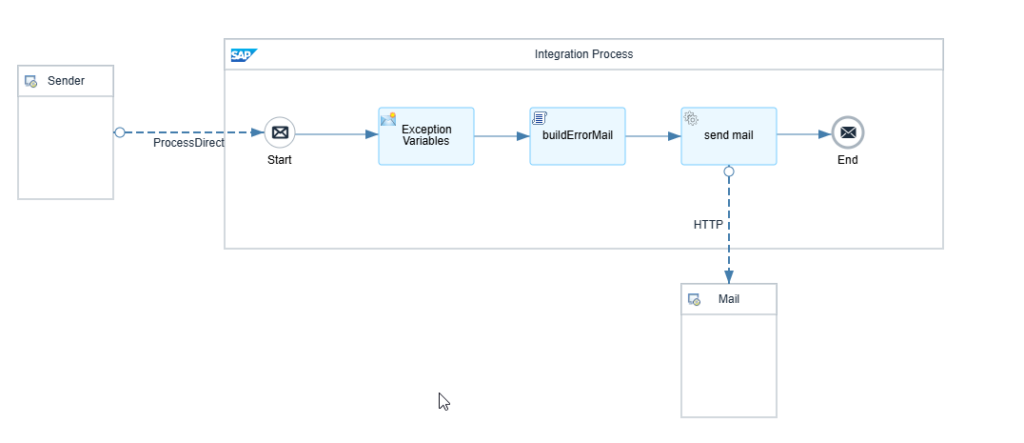
In the following you see a screenshot of the error iFlow. The iFlow is triggered via a Process Direct connection. The required parameters are passed via message headers. Inside the iFlow, the email payload is generated and sent to the mail server via HTTP. Let’s go through the steps one by one and have a look in detail.
💡When creating reusable iFlows, consider placing them in a dedicated common package. The same package can also contain a script collection for reusable Groovy scripts.
Steps
Sender
Use Process Direct as the connection type and define the target endpoint in the Address field, for example “/common/errorLogService”.
Exception Variables – Content Modifier
This step mainly acts as a placeholder. If there are any variables that are common to all exceptions and do not need to be provided externally, define them here. For example, if the email address is always the same, you can simply set it as a message header in this Content Modifier.
buildErrorMail – Groovy Script
The Groovy script is stored in a script collection. Since the goal is reusability, keeping shared scripts in a central location makes maintenance much easier. The script takes care of everything you need to send a mail via Microsoft Graph Mail API.
package  script


import  com.sap.gateway.ip.core.customdev.util.Message

import  groovy.json.JsonOutput


def  Message  processData(Message  message) {


def messageLog = messageLogFactory.getMessageLog(message)

messageLog.addAttachmentAsString(

"HEADERS",

message.getHeaders().toString(),

"text/plain"

)


try {


Map data = [

systemName : System.getenv("TENANT_NAME") ?: "",

iflowName : message.getHeaders().get("EXC_IflowName")?.toString() ?: "",

packageName : message.getHeaders().get("EXC_PackageName")?.toString() ?: "",

sender : message.getHeaders().get("EXC_Sender")?.toString() ?: "",

receiver : message.getHeaders().get("EXC_Receiver")?.toString() ?: "",

mplId : message.getHeaders().get("EXC_MplId")?.toString() ?: "",

correlationId : message.getHeaders().get("EXC_MplCorrelationId")?.toString() ?: "",

timestamp : message.getHeaders().get("EXC_Timestamp")?.toString() ?: "",

errorText : message.getHeaders().get("EXC_ErrorText")?.toString() ?: "",

recipients : message.getHeaders().get("EXC_Recipients")?.toString() ?: ""

]


def recipientsJson = buildRecipients(data.recipients)


data.msgIDLink = buildMonitoringLink(data.mplId)


def subject =

"CPI Error | ${data.iflowName} | ${data.systemName}"


def bodyContent = buildMailBody(data)


def mailJson = buildGraphMail(

subject,

bodyContent,

recipientsJson

)


message.setBody(mailJson)

message.setHeader("Content-Type", "application/json")


}

catch (Exception e) {


if (messageLog) {


messageLog.addAttachmentAsString(

"Groovy Exception",

e.toString(),

"text/plain"

)


messageLog.addAttachmentAsString(

"Groovy Stacktrace",

e.getStackTrace().join('\n'),

"text/plain"

)

}


throw e

}


return message

}


List  buildRecipients(String  recipientsRaw) {


return recipientsRaw

.split(",")

.collect { it.trim() }

.findAll { it }

.collect {

[

emailAddress: [

address: it

]

]

}

}


String  buildMonitoringLink(String  mplId) {


String url =

"${System.getenv('TENANT_NAME')}." +

"${System.getenv('IT_SYSTEM_ID')}." +

"${System.getenv('IT_TENANT_UX_DOMAIN')}"


String monitoringUrl =

"https://${url}:443/itspaces/shell/monitoring/MessageDetails/%7B%22messageGuid%22%3A%22${mplId}%22%7D"


return  "<a href='${monitoringUrl}'>${mplId}</a>"

}


String  buildGraphMail(

String  subject,

String  bodyContent,

List  recipients

) {


def mailMap = [

message: [

subject: subject,

body: [

contentType: "HTML",

content: bodyContent

],

toRecipients: recipients

],

saveToSentItems: true

]


return  JsonOutput.toJson(mailMap)

}


String  buildMailBody(Map  data) {


return  """

<html>


<head>


<style>


body {

font-family: Arial, sans-serif;

font-size: 14px;

color: #333333;

background-color: #ffffff;

margin: 0;

padding: 20px;

}


.mail {

width: 1000px;

margin: auto;

background: #ffffff;

border: 1px solid #d9d9d9;

}


.content {

padding: 20px;

}


table.details {

width: 100%;

border-collapse: collapse;

}


table.details td,

table.details th {

border: 1px solid #d9d9d9;

padding: 10px;

}


.label {

width: 220px;

font-weight: bold;

background-color: #fafafa;

}


.error-box {

background-color: #fff5f5;

border-left: 4px solid #c62828;

padding: 15px;

color: #b71c1c;

font-family: Consolas, Courier New, monospace;

white-space: pre-wrap;

line-height: 1.5;

}


.footer {

margin-top: 25px;

padding-top: 15px;

border-top: 1px solid #e5e5e5;

color: #666666;

font-size: 12px;

}


</style>


</head>


<body>


<div class="mail">


<table width="100%" cellpadding="0" cellspacing="0" border="0">


<tr>

<td bgcolor="#c62828"

style="

color:white;

padding:14px 18px;

font-size:20px;

font-weight:bold;

font-family:Arial,sans-serif;

">

SAP Integration Suite Error

</td>

</tr>


<tr>

<td

style="

padding:16px 18px;

color:#555555;

font-size:14px;

border-bottom:1px solid #e5e5e5;

font-family:Arial,sans-serif;

">

An error has been detected in the SAP Integration Suite.

Please investigate the issue using the details below.

</td>

</tr>


</table>


<div class="content">


<table class="details">


<tr>

<td class="label">Environment</td>

<td>${data.systemName}</td>

</tr>


<tr>

<td class="label">Interface Name</td>

<td>${data.iflowName}</td>

</tr>


<tr>

<td class="label">Package</td>

<td>${data.packageName}</td>

</tr>


<tr>

<td class="label">Sender</td>

<td>${data.sender}</td>

</tr>


<tr>

<td class="label">Receiver</td>

<td>${data.receiver}</td>

</tr>


<tr>

<td class="label">Message ID</td>

<td>${data.msgIDLink}</td>

</tr>


<tr>

<td class="label">Correlation ID</td>

<td>${data.correlationId}</td>

</tr>


<tr>

<td class="label">Timestamp</td>

<td>${data.timestamp} UTC</td>

</tr>


<tr>

<th colspan="2" align="left">

Exception Details

</th>

</tr>


<tr>

<td colspan="2">


<div class="error-box">

${data.errorText}

</div>


</td>

</tr>


</table>


<div class="footer">


Best Regards<br/>

SAP Integration Monitoring System


<br/><br/>


<i>

This is an automatically generated email. Please do not reply.

</i>


</div>


</div>


</div>


</body>


</html>

"""

}
Mail – Receiver
Configure the connection type as HTTP and specify the Microsoft Graph API endpoint in the Address field. Enter the Security Material (the outsourced OAuth2 Client Credentials) in the Credential Name.
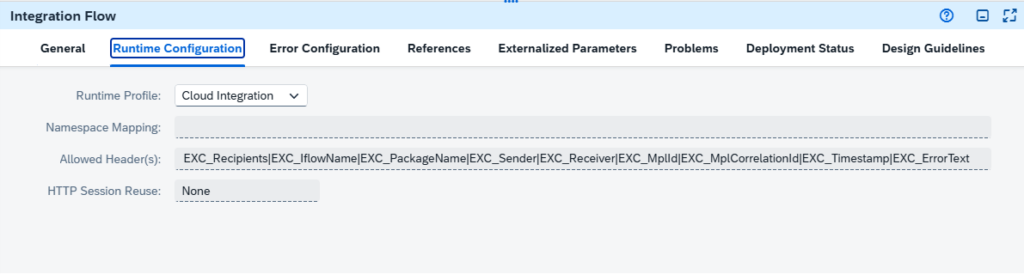
Integration Flow Settings
Its important to list the allowed headers in the runtime configuration. Otherwise, the headers will not be forwarded through the Process Direct call.
References
Your script collection should be linked here under the tab global.
Externalized Parameters
Make sure to externalize parameters such as the Microsoft Graph endpoint and credentials. This allows changes to be made via Configure & Deploy without modifying the integration artifact.
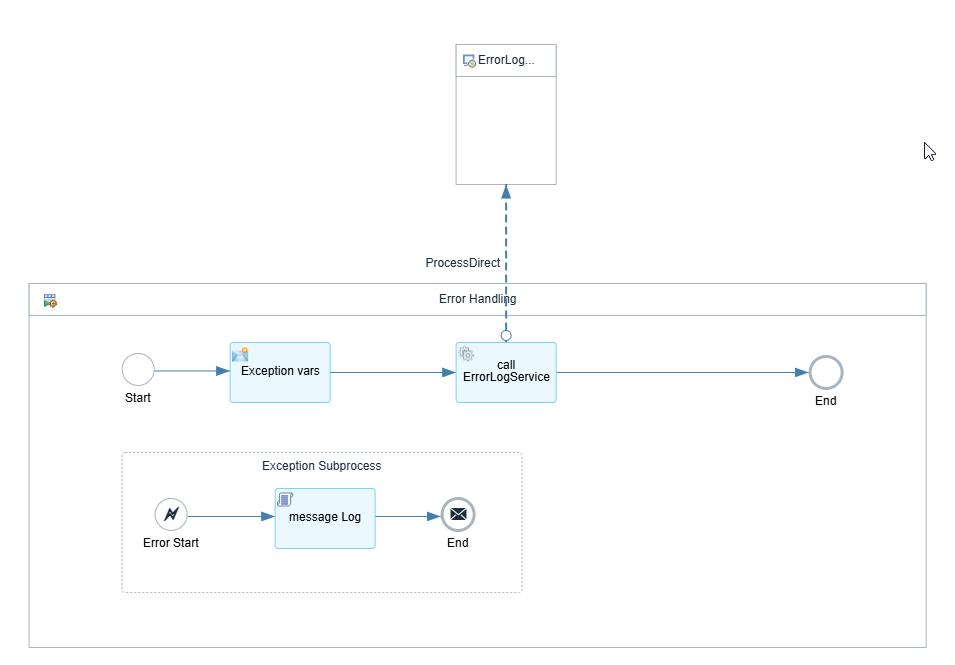
Integration in other iFlows
Integrating the error iFlow into other iFlows is straightforward. I would always recommend to create a local integration process where you put the error handling. You just need one content modifier that set’s the important message headers. Afterwards you can just call the iFlow via Process direct connection.
Supported Parameters
The Groovy script evaluates the following message headers.
| Message Header | Description | Value |
|---|---|---|
| EXC_IflowName | The name of the iFlow where the error occured | ${camelContext.getName} |
| EXC_PackageName | The name of the integration package. (Sadly there is no way to access it through an expression) | XXX_XXX |
| EXC_Sender | Sender | NYSE |
| EXC_Receiver | Receiver | SAP MRM |
| EXC_MplId | Message Processing Log ID for unique identification of the processing | ${property.SAP_MessageProcessingLogID} |
| EXC_MplCorrelationId | Correlation ID for tracking related messages | ${header.SAP_MplCorrelationId} |
| EXC_ErrorText | Details from the exception | ${property.CamelExceptionCaught} |
| EXC_Timestamp | Timestamp of the error | ${date:now:yyyy-MM-dd HH:mm} |
| EXC_Recipients | Email addresses. Multiple recipients can be specified by separating them with commas. | xxx@xxx.de,xxx@xxx.com |
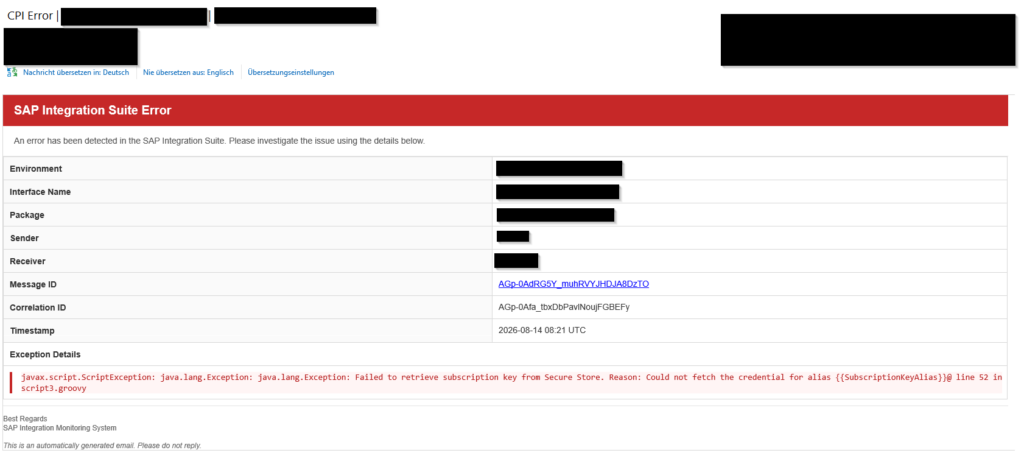
The result
When an error occurs, the common error iFlow is triggered and sends a notification email. This provides a simple and standardized approach to error handling and email dispatch across multiple integrations.
That’s it. We’re done. I just have to mention this at the end. After one month of working with SAP Integration Suite, I can confidently say that it’s a very clunky tool with poor usability.
The technology behind is actually quite powerful. If you need to connect SAP to pretty much anything, chances are Integration Suite can handle it. The problem isn’t the capability, it’s the user experience. Most of my frustration comes from the tooling itself, not from the integration scenarios I’m trying to solve.
The endless loading indicators, the constant waiting, and the fact that a simple navigation step can take several seconds quickly becomes frustrating when you’re working with the tool every day. It’s not a deal-breaker, but it definitely slows you down.
There is a reason why SAP recommends using Fiori Elements wherever possible instead of freestyle development. After spending some time in Integration Suite, that recommendation starts to make a lot of sense. Looking at some of the freestyle tooling and development experience SAP delivers itself, it’s hard to argue otherwise.
So if you’re just getting started with Integration Suite and occasionally find yourself wondering whether you’re the problem, don’t worry. You’re not alone. The platform is powerful, but getting there sometimes requires a healthy amount of patience.